

|
|
|
|
|
Okay. So we've got a form that lets our visitors enter their information, but how do we get the data back? |
|

|
|
|

|
|
FrontPage will send it to us via e-mail, or put it on a web page for us. Or, with the help of a programmer, we can put it into a database. |
|
|
NOTE: Check with your Internet Service Provider to make sure your server supports FrontPage 98. |
|
|
Let's set up our survey so the answers are e-mailed to us. That way, we'll know as soon as someone completes one. |
|
|
|
|
|
|
Good idea! As kids of the future, we love immediacy. Though, our attention spans aren't as bad as people once predicted. Right, Pixel? |
|
|
Huh? I wasn't paying attention. Just kidding. |
|
|
|
|
To have your visitors' data sent to you by e-mail:
2. Select Form Properties from the pop-up menu.
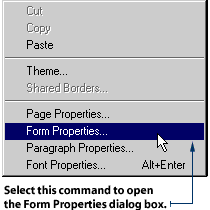
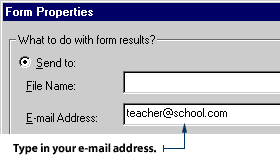
3. Click the Send To radio button to select it. 4. Delete the File Name that appears by default in the Form Properties dialog box. Leave this space blank. 5. Type your e-mail address into the E-mail Address text box, then click OK.
|
|
|
|
|
We can also have the data sent to a web page. That way, other people can see the results of the survey, too. |
|
|
Yeah, it can be like one of those bulletin boards that people used to put their messages on. How retro, Blip. |
|
|
|
|
To have your visitors' data sent to a web page:
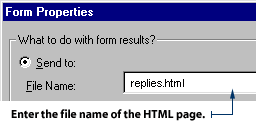
2. Select Form Properties from the pop-up menu. 3. Click the Send To radio button to select it. 4. Enter the file name of an existing HTML page in your web site, or click the Browse button to choose a page. This page is where FrontPage will send your visitors' data.
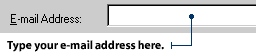
5. To receive e-mail notification when a visitor sends a response to the web page, type your e-mail address into the Form Properties dialog box.
5. Click OK in the Form Properties dialog box. NOTE: If you prefer to keep the web page private, you should send the form data to an HTML page in your _Private folder. Just click the Browse button in the Form Properties dialog box and navigate to the _Private folder. Then, select or create an HTML page there. When you send your form data to a web page located in the Private folder, the majority of your visitors will not see it. However, some technical people may be able to crack into the file and read its contents.
|

|

|

|